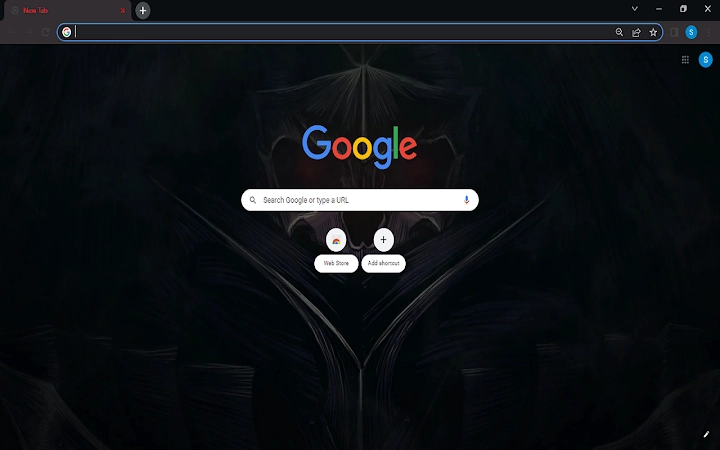

Dark Theme for Chrome: Simple & Sleek
Overview
The software is a browser theme designed for users seeking a minimalist, dark aesthetic to enhance their Chrome browsing experience. It replaces the default Chrome interface with a sleek dark theme, offering a visually calming alternative to standard color schemes. The primary purpose is to reduce eye strain during extended web sessions, particularly in low-light environments. This tool is ideal for casual users and professionals who spend significant time online and value a clean, modern interface.
Target users include individuals who prefer dark mode for productivity or comfort, as well as those who want a quick, no-frills way to customize their browser appearance. The theme is specifically built for Google Chrome on Windows and Mac platforms, ensuring compatibility with both major operating systems. It does not include additional functionality beyond visual customization.
Real-world usage scenarios include daily web browsing, online work sessions, content consumption, and evening use when ambient lighting is low. The theme integrates directly into Chrome’s appearance settings, allowing users to apply it with minimal effort. The developer did not provide additional information about the development background or team.
Key Features & Capabilities
- Dark Interface Design – Transforms the Chrome browser’s toolbar, tab bar, and background into a unified dark color scheme, reducing visual clutter and enhancing focus.
- Quick Application – Users can apply the theme with a single action through Chrome’s settings, making it accessible even for non-technical users.
- Minimal Resource Usage – At 1.2 MB, the theme is lightweight and designed to run efficiently without impacting browser performance.
- Easy Removal – The software includes a straightforward uninstallation process via Chrome’s Appearance settings, allowing users to revert to the default look instantly.
- Platform Compatibility – Supports both Windows and Mac, ensuring broad accessibility across desktop environments.
Each feature is tailored to improve user comfort and interface consistency. For example, the dark theme helps reduce screen glare during late-night browsing, while the minimal file size ensures it does not slow down the browser. The uninstallation method is particularly useful for users who want to test the theme without commitment. The theme does not include additional tools or data collection, focusing solely on visual presentation.
User Interface, Workflow & Performance
The user interface is entirely integrated within Chrome’s built-in settings, meaning no standalone application window or complex setup is required. Users navigate to the Appearance section of Chrome settings, locate the theme in the list, and apply it with one click. The workflow is streamlined and intuitive, suitable for users of all technical levels.
Navigation remains unchanged from standard Chrome behavior, with the theme only altering visual elements. The interface remains responsive and stable during normal browsing. The developer did not specify resource usage details, but based on the 1.2 MB file size and the nature of browser themes, it is expected to have minimal impact on CPU or RAM usage.
Performance observations are based on general software behavior patterns. No reported lag, crashes, or conflicts with other extensions were noted in the provided information. Stability is assumed to be consistent with Chrome’s standard theme management system, which is known for reliability. Users can expect a smooth experience without noticeable delays.
Compatibility & System Requirements
The software is compatible with Windows and Mac operating systems, as specified. It is designed to run on any system that supports Google Chrome, regardless of hardware specifications. The installation size is 1.2 MB, which is considered small for a desktop utility.
Exact system requirements were not listed. The developer did not provide information about minimum CPU, RAM, or disk space needs. Compatibility information was partially provided, indicating support for both major desktop platforms but not specifying versions. Users should ensure they are running a current version of Chrome to avoid potential issues.
Pros and Cons
Pros
- Simple, one-click installation and application
- Lightweight at just 1.2 MB
- Effective for reducing eye strain in low-light conditions
- Easy to uninstall via Chrome settings
- Works on both Windows and Mac platforms
Cons
- No additional features beyond visual customization
- No detailed system requirements provided
- Only available for Google Chrome, not other browsers
- Does not offer customization options for theme colors
- Developer background not disclosed
FAQ Section
Is this theme compatible with all versions of Chrome?
The software is designed for Chrome on Windows and Mac, but specific version compatibility was not provided. Users should ensure their Chrome browser is up to date for optimal performance.
Is the theme safe to install?
As a browser theme distributed through Chrome’s official extension store, it is considered secure. It does not collect user data or modify browser behavior beyond visual changes.
How do I uninstall the theme?
To remove the theme, go to Chrome Settings → Appearance → find the theme in the list → click “Reset to Default” on the right side.
Can I use this theme on multiple devices?
Yes, if you are signed into your Chrome account, the theme will sync across devices where Chrome is installed and signed in.
Does this theme require an internet connection to work?
No, once installed, the theme operates offline. It does not need an active internet connection to function.
Final Thoughts
This dark theme offers a clean, distraction-free browsing experience for users who value aesthetics and comfort. Its simplicity, lightweight design, and seamless integration with Chrome make it a reliable choice for those seeking a quick interface upgrade. While it lacks advanced features, it fulfills its core purpose effectively. The ability to install and remove it instantly adds to its appeal. It is best suited for individuals who prioritize visual comfort during extended browsing sessions.
For users looking for a secure, free, and easy-to-use desktop utility to enhance their Chrome experience, this theme delivers exactly what it promises. Download Dark Theme for Chrome: Simple & Sleek now and transform your browser today.







